
Shopify preorder deposits and partial payments: The complete guide
Shopify doesn't support collecting deposits or split payments at checkout natively. For most merchants selling preorder or made-to-order products, that means either the hard sell of asking for full payment upfront, or handling partial payments manually through invoices and workarounds. This guide covers how Shopify preorder deposits work, which selling strategies benefit from partial payment on Shopify, how deposits compare to buy now, pay later, and how merchants are using Downpay to automate the whole workflow inside native checkout.
What is a deposit?
A deposit is a partial payment collected upfront to secure an order. The customer pays a portion of the total (typically 20–50%) and the remaining balance is collected later, usually when the product is ready to ship.
Deposits are a standard practice in industries where products are made to order, have long lead times, or require significant commitment from both sides. Custom furniture workshops, jewelers, contractors, and event vendors have collected deposits for decades, often by phone or invoice.
The logic is the same regardless of the industry: the customer commits without having to pay in full before the product exists, and the merchant gets confirmation of intent before investing in production.
For customers, a deposit also signals something about the merchant. Offering one says the merchant understands that handing over several thousand dollars for something that won't arrive for months is a genuine ask, and has designed the payment experience around that reality.
The hesitation a customer feels at a high-AOV checkout isn't a UX problem or a friction problem. It's a rational response to uncertainty. Deposits work because they change the timing of commitment, not the price.
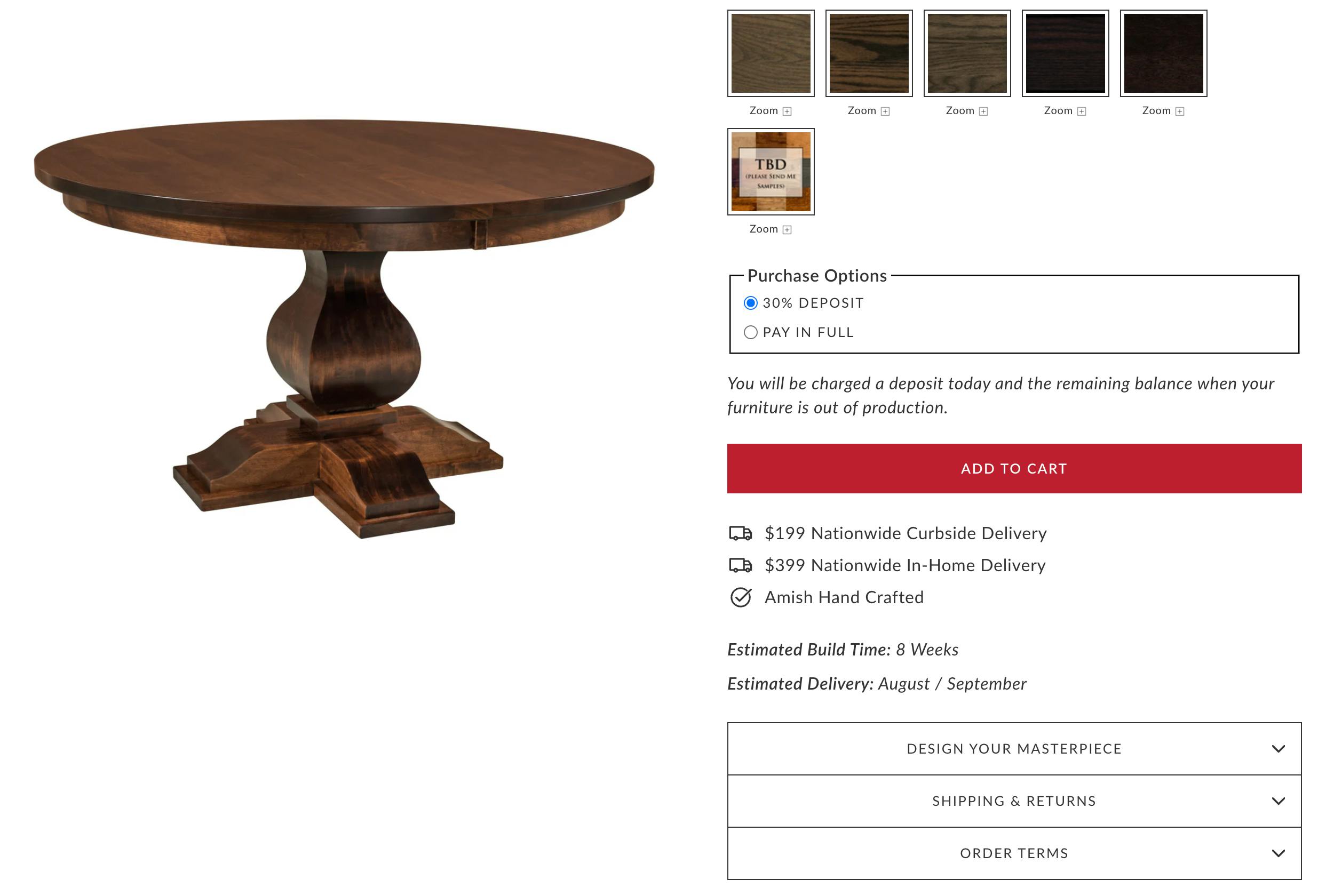
QW Furniture made-to-order table with Downpay deposit option on Shopify
How to collect Shopify preorder deposits and partial payments
Shopify doesn't support partial payment or split payment at checkout natively for standard storefronts. There are three options available to merchants, depending on their setup:
Manual bank deposit
Shopify includes a built-in manual payment method called "Bank deposit." You configure it under Settings > Payments > Manual payment methods, and add instructions (bank name, account details) that appear to customers after they place an order. The customer transfers funds directly to your account; you verify receipt, then fulfill.
This is the no-app route, but it has real limitations. You have to manually confirm each transfer before fulfilling. There's no card stored on file, so collecting a balance later requires a separate invoice or follow-up. It works for occasional, low-volume use, but doesn't scale and has no automation.
Shopify Plus B2B
Shopify Plus merchants using B2B features can require a percentage-based deposit at checkout within company location payment terms, specifically by enabling "Require deposit on orders created at checkout." This is native, but it applies only to B2B wholesale customers through Shopify's B2B channel, not to a standard storefront.
Third-party deposit apps
For online storefronts, collecting a deposit at checkout with a card stored on file for the balance requires a third-party app. Downpay is a Shopify app built specifically for this. It runs inside native Shopify checkout, stores the customer's card via Shopify's own payment infrastructure, and handles balance collection automatically or manually, with no redirects or credit applications.
How Shopify deposits work with Downpay:
- The merchant configures a deposit amount per product, variant, or across their whole store, either a fixed amount or a percentage
- The customer pays the deposit inside Shopify checkout using their preferred payment method, including Shop Pay
- Their card is stored securely via Shopify's payment infrastructure
- The balance is collected automatically on fulfillment, on a set date, or manually by the merchant
See How Downpay handles deposits on Shopify for more technical detail, try Downpay's interactive demo, or install Downpay free to get started.
Deposits vs. Buy Now, Pay Later
Buy Now, Pay Later (BNPL) apps like Affirm, Klarna, and Afterpay appear at checkout and let customers split a purchase into installments. They're a form of consumer financing: the provider pays the merchant in full, then collects from the customer over time.
Deposits are different in almost every way:
- Who takes on the risk. With BNPL, a third-party lender extends credit to the customer and assumes the default risk. With deposits, no credit is extended. The customer pays a portion of what they already agreed to pay, and the balance comes from the same card later.
- What it costs the merchant. BNPL providers charge merchants a transaction fee, typically 2–8% of the order value, plus in some cases a percentage of revenue on each sale. Deposit apps like Downpay charge a flat monthly subscription with no per-transaction fees.
- Who the customer relationship belongs to. BNPL sends customers to a third-party financing experience, sometimes off your storefront entirely. A deposit app running inside Shopify checkout keeps the experience branded, and the payment relationship stays between the merchant and their customer.
- Who uses it. BNPL is designed for shoppers who can't afford a purchase at all without financing. Deposits are for shoppers who can afford the product but need the timing to align with production. A customer putting 30% down on a custom dining table isn't being financed. They're committing.
For a detailed look at the business risks BNPL carries for merchants, including transaction fees, reputational exposure, and regulatory pressure, see The full story on Buy Now, Pay Later for e-commerce businesses.
Signs deposits are a good fit for your store
Deposits work well in specific conditions. If most of these apply to your business, the setup overhead is almost certainly worth it.
- Average order values of $500 or more: Below this threshold, the conversion benefit of a deposit rarely outweighs the added checkout complexity for customers
- Products with lead times: Made-to-order, custom-built, or long-restock items where customers are being asked to pay in full before anything ships
- Already taking deposits manually: If you're collecting deposits by phone, invoice, or PayPal, you've already validated the model; automating it through checkout removes the admin burden and reduces customer confusion
- Cancellation risk on backorders or preorders: If you're seeing customers drop off or request refunds while waiting on stock, a deposit at order time changes the commitment dynamic
Deposits are not a substitute for consumer financing. If your goal is to help customers who can't afford the product spread the cost across months, that's the Buy Now, Pay Later use case. Deposits are for customers who can afford the purchase: the goal is aligning the payment with the timeline, not extending credit.
Selling strategies that use deposits
Made to order
Made-to-order products are built after the customer places an order. Lead times can run from two weeks to several months, and materials may be sourced or reserved specifically for that customer's configuration.
Deposits are well-suited to this model for two reasons. First, they cover a portion of production costs before work begins, which improves cash flow. Second, they create real commitment: a customer who has already paid 40% is far less likely to cancel than one who paid nothing.
Many merchants selling made-to-order products are already collecting deposits when they find a solution like Downpay. They're doing it by phone, email, or PayPal invoice. The manual process is enough to prove the model works, but it doesn't scale. Chargebacks are harder to defend. Customers who receive an invoice without clear context can be confused about what they're paying. And the admin overhead grows with every order.
QW Furniture reduced their manual deposit process entirely after installing Downpay. Before, customers had to call in to arrange payment. Now it happens at checkout. Online sales grew 30%. Read the full story.
Havens Luxury Metals, a premium metal fabricator, uses deposits to close custom orders faster and reduce the time between inquiry and commitment. Read the full story.
1825 Interiors uses deposits for both preorder and custom furniture, and lifted average order value by 20% after adding Downpay. Read the full story.
Learn more about addressing the made-to-order and custom product use case.
Preorders
A preorder is a sale made before a product exists or is ready to ship. Merchants use them to gauge demand before committing to a production run, or to generate revenue from a launch before inventory arrives.
The risk with full-price preorders is that customers who pay everything upfront are more likely to cancel if the timeline slips. A Shopify preorder deposit keeps them committed without the full financial exposure of paying in advance for something with an uncertain ship date.
Shopify's native preorder button doesn't support partial payment: it captures the full amount at checkout. To offer a deposit instead of full payment at the preorder stage, a third-party app is required.
OOONO ran a deposit-backed preorder campaign for their CO-DRIVER NO2 device and sold 50,000 units in 23 hours. Read the full story.
Headphones.com uses deposits specifically to reduce cancellations on preorders for limited high-end audio equipment. Read the full story.
Shopify's own Hardware Store ran a $0 deposit preorder for their POS Hub device, storing cards on file and charging customers only when units were ready to ship. Read the full story.
Read more about using deposits to meet the Shopify preorder use case.
Backorders
A backorder is a sale made on a product that exists but is temporarily out of stock. The distinction from preorders matters for how you communicate to customers and how you manage inventory: a backorder has a known product and usually a shorter, more predictable restock timeline.
The challenge with backorders at full price is that customers who pay in full while waiting are more likely to cancel or request a refund if the wait stretches. A deposit keeps them committed without requiring them to hand over the full amount before the product is back in hand.
Backorders are also where the cancellation problem is most acute for high-AOV merchants. A $2,000 audio component or a sold-out fitness product sitting in a cart at full price has a high abandonment rate. A deposit of 20–30% raises the threshold for cancelling: the customer has already made a financial commitment and is less likely to walk away.
Frame ran out of stock during Black Friday but kept selling by taking deposits on backordered units, capturing 20% of their BFCM revenue that would otherwise have been lost entirely. Read the full story.
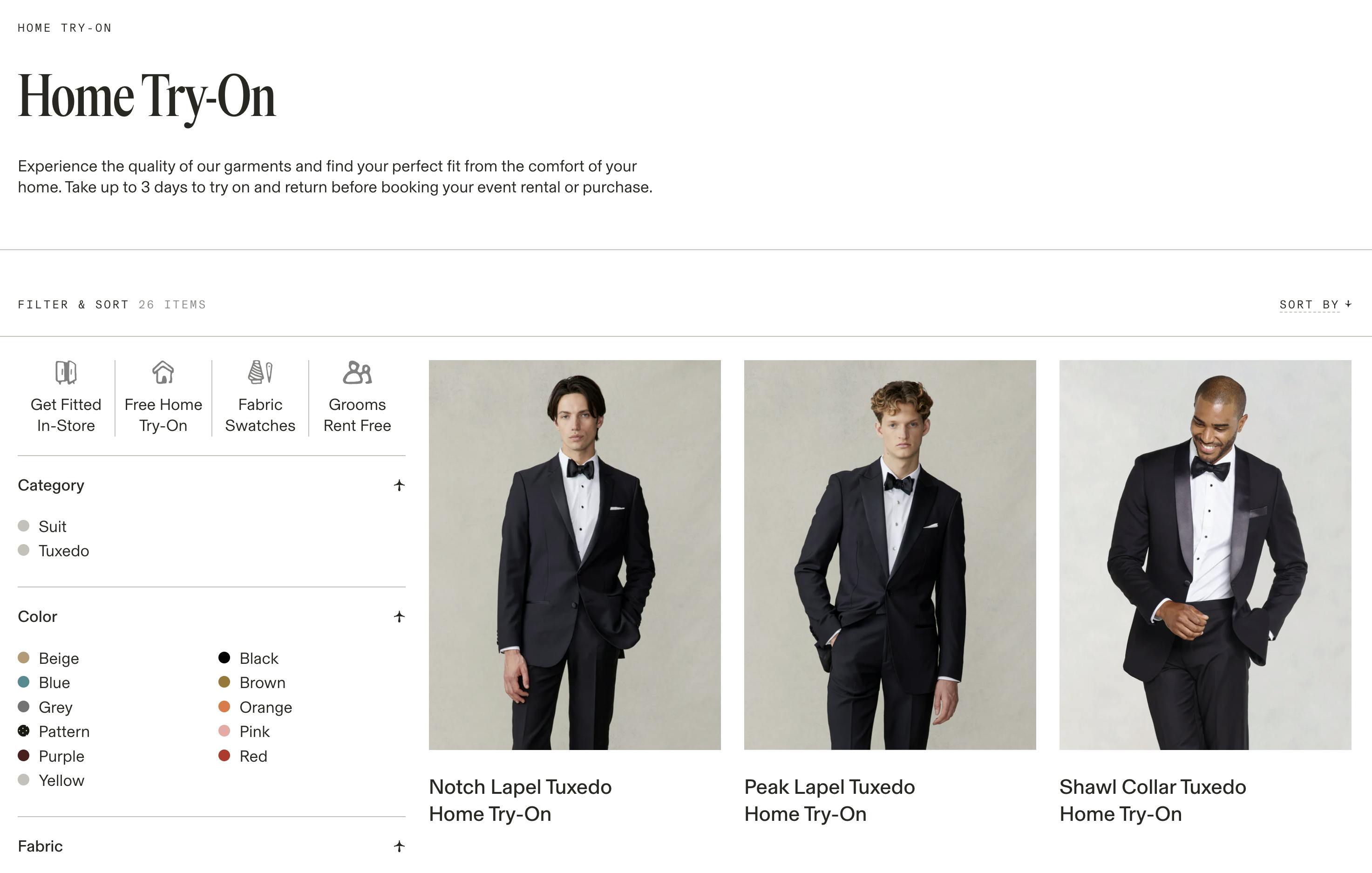
The Black Tux lets customers try on suits before renting or buying.
Rentals and bookings
For rental businesses and service bookings, deposits solve a different problem than they do for made-to-order merchants. The issue isn't conversion; it's commitment. A charter boat, an equipment hire company, or an event florist has finite availability. A customer who books without any financial stake cancels more easily. A customer who has paid a deposit has skin in the game.
A last-minute cancellation doesn't just lose the sale. It blocks a slot from being resold at short notice. Even a modest deposit changes the calculus for both sides.
A $0 deposit with a card stored on file is also worth considering for bookings: nothing is charged at reservation, but the card is secured for later collection. This suits travel, venue hire, and service businesses where charging anything upfront may deter early commitment but holding a card provides enough assurance.
Magical Tiki increased charter boat bookings by collecting deposits through Shopify with automatic balance collection. Read the full story.
The Black Tux built their entire Shopify migration around deposit-backed rentals, using Downpay to handle both home try-on and event bookings. Read the full story.
Learn more about bookings and service-based product deposits.
Try before you buy
Try before you buy collects $0 at checkout and stores the customer's card on file. If the customer doesn't initiate a return within the trial window (typically 7–10 days) the full amount is charged automatically.
This works well for products where fit and feel matter: apparel, eyewear, furniture swatches. The customer has nothing to lose by trying; the merchant has a committed card waiting.
Welham & Co, which sells custom family portraits, uses a $0 upfront model: customers only pay after seeing their portrait. Conversions grew 25%. Read the full story.
The Black Tux also uses this model for their home try-on program, letting customers try on suits before confirming a rental. Read the full story.
B2B wholesale
B2B merchants often need to collect a partial payment on large orders before work begins or goods ship. Net terms, high order values, and longer production timelines all make deposits a natural fit.
For B2B merchants using Shopify's native B2B features and Shopify Plus, deposits can be required through the B2B storefront channel as covered in the How to collect deposits on Shopify section above.
For draft orders, which don't currently support deposit apps natively, there are two workarounds, neither of which are ideal:
- Split payment via POS: Create a draft order in the Shopify admin with payment due later, then use Shopify POS to collect a partial payment in person or by manually entering card details. The order updates to "partially paid" in the admin.
- Separate invoices: Send one invoice for the deposit amount and a second when the order is ready to ship. Note this creates two separate order records, which has inventory implications.
For B2B merchants running wholesale through the standard Shopify storefront rather than draft orders, a deposit app works without modification.
Learn more about using deposits for Shopify B2B and wholesale.
Get inspiration from other merchants
See how more merchants are using Shopify preorder deposits and partial payments in Downpay's brand lookbook.
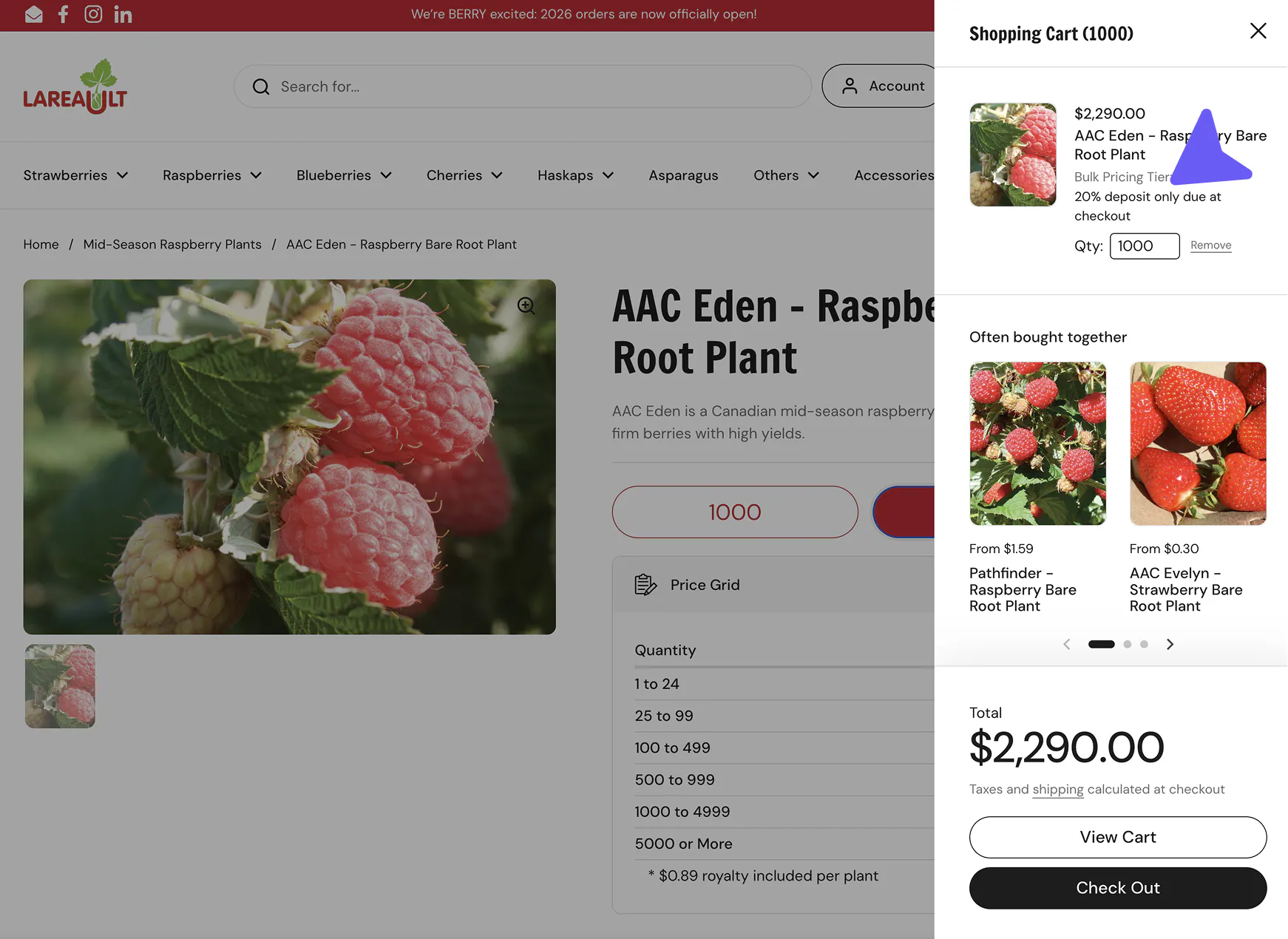
Industries where deposits are standard
Furniture and homewares
Custom and made-to-order furniture has used deposits as standard practice for decades. Lead times are long, pieces are often built to specification, and order values (typically $500 to $10,000+) make full upfront payment a meaningful conversion barrier.
Modern Bungalow uses deposits for their curated collection of Amish-made furniture and saw a 47% boost in conversion. Read their story.
Gainsville furniture switched to Shopify with Downpay and unlocked 10% of revenue that their prior platform couldn't capture. Read their story.
Learn more about how furniture and homewares merchants use Shopify deposits with Downpay.
Jewelry
Bespoke and fine jewelry carries high order values and meaningful wait times. For made-to-order pieces (custom engagement rings, commissioned work), deposits also carry a non-refundable element, since the work is unique to the buyer and can't easily be resold.
Ma Folie switched from BNPL to Downpay deposits and saved 95% on payment app fees in the process. Read their story.
Athena Gaia, which makes handmade Greek jewelry, grew average order value by 25% after adding a deposit option at checkout. Read their story.
Read more about Shopify deposits in the jewelry industry.
Apparel and fashion
Sustainable fashion and made-to-order apparel benefit from deposits because production runs are often funded by the orders themselves. Collecting a deposit before cutting fabric reduces financial risk and gives merchants production confidence.
The Black Tux used deposits to anchor their move to Shopify, handling both rental commitments and try-before-you-buy programs. Read their story.
Find out more about how apparel and fashion stores use Downpay for deposits on Shopify.
Travel and experiences
Travel bookings benefit from deposits at two stages: when a customer reserves a spot (locking in their commitment), and closer to the travel date (collecting the balance before departure).
The deferred payment model also works well here: store the card at booking, charge closer to departure. Customers get flexibility; operators get guaranteed revenue.
Learn more about how the travel industry benefits from Shopify preorders.
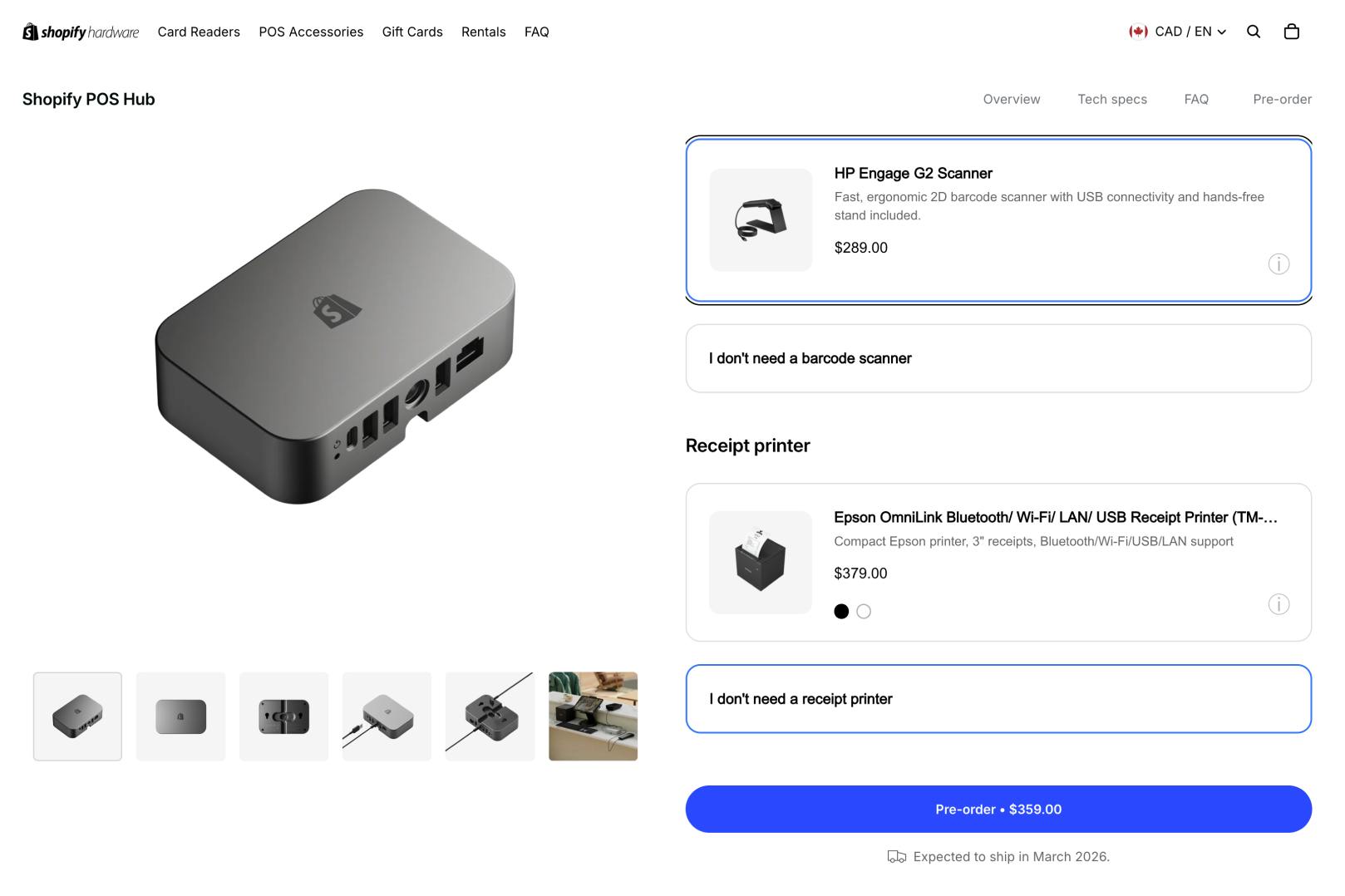
Shopify's Hardware Store ran a pre-order for their POS Hub device, using a $0 deposit to secure orders but charge customers later from the card on file.
Farm-fresh goods and CSA
Community-supported agriculture programs and farms raising animals for sale use deposits to confirm orders and plan capacity. A deposit at sign-up means a farmer knows how many shares to plant or how many animals to raise before a single box ships.
Technology and consumer electronics
Consumer electronics brands with limited supply use preorder deposits to gauge real demand before committing to a production run.
Sirène launched their first product using deferred payment at scale, building customer trust before charging a single card. Read the full story.
Headphones.com uses deposits to hold customer commitment on backordered high-end audio equipment, reducing costly cancellations on $500–$5,000+ orders. Read the full story.
How Downpay handles deposits on Shopify
When a customer checks out with a deposit option, they pay through standard Shopify checkout, using the most popular payment gateways and their card is stored on file for the balance. Everything appears in the Shopify admin as a partial payment. There's no separate dashboard and no off-platform reconciliation.
The balance can be collected:
- Automatically, on fulfillment: Downpay charges the stored card when you mark the order fulfilled
- Automatically, on a set date: you specify a number of days after checkout and the balance is captured without manual intervention
- Manually: from the Shopify admin, on demand
- By invoice: Downpay can send a payment link directly to the customer
Why card on file matters: Some merchants work around Shopify's native limitations by having customers check out with the deposit price. This causes problems: customers can be surprised when the full balance is charged later. Card on file avoids this: the customer sees accurate terms at checkout, commits once, and the balance is charged against the same card.
Payment gateways supported: Shopify Payments, Stripe, PayPal Express, and Adyen for Shopify Plus merchants.
Shop Pay: Downpay is compatible with Shop Pay, which means customers can use their stored Shop Pay credentials to check out with a deposit.
Shopify Flow: For merchants on Shopify Plus, Downpay integrates with Shopify Flow to automate balance collection based on order and fulfillment triggers.
Pricing: Downpay charges a flat monthly fee with no per-transaction fees. See Downpay's pricing page for current plan details.
How to run effective Shopify deposit campaigns
Set the right deposit amount
Most merchants find 25–50% works well for made-to-order products. Enough that the customer has real skin in the game; not so much that it recreates the friction of paying in full. For lower-risk products or try-before-you-buy, $0 with a card on file is a viable option.
Be explicit about when the balance will be collected
The most common source of customer confusion with deposits is a surprise charge. Put the collection date or trigger in plain language on the product page and at checkout. If you're using a deposit app, check whether it surfaces this automatically in the checkout flow — most do, but a clear product description reinforces it regardless.
Write a cancellation policy before you go live
Define what happens if a customer cancels before the product ships. Non-refundable deposits are standard for truly custom or commissioned work. Refundable deposits may be appropriate for preorders with uncertain timelines. Either is fine; ambiguity is not.
Announce deposits as a feature, not fine print
Merchants who get the most out of deposit campaigns treat them as a selling point. "Reserve yours with a 30% deposit, pay the balance when it's ready" is a feature. Putting the deposit terms only in the checkout modal is an afterthought. Lead with it on product pages and in any marketing.
Automate balance collection where possible
Manual balance collection is fine at low volume, but it creates overhead at scale. Look for deposit solutions that support automatic collection on fulfillment, on a set date, or via Shopify Flow triggers. For merchants on Shopify Plus, Flow can trigger balance collection based on fulfillment status, tag changes, or other order events without any manual intervention.
For more actionable tips and best practices on creating successful deposit campaigns, check out Downpay's e-book, Boosting Sales on High-Value Products with Deposits.

Frequently asked questions
What is the best Shopify preorder app for deposits?
For preorders with deposit collection, Downpay is purpose-built for this use case. It runs inside native Shopify checkout, stores cards on file via Shopify's own payment infrastructure, and collects the balance automatically on fulfillment or a set date. It supports preorders, backorders, made-to-order, and other uses with monthly pricing and no per-transaction charges. Visit the interactive demo to see it in action.
What is the difference between a split payment and a deposit on Shopify?
The terms are often used interchangeably, but there's a practical distinction.
- A deposit is typically a percentage or fixed amount collected upfront to secure an order, with the balance due later based on fulfillment or a schedule.
- Split payment on Shopify more broadly refers to dividing any order total across multiple payment methods or points in time.
Downpay handles both: you can collect a deposit at checkout and charge the balance automatically, or split an order across two payment events on a schedule.
How does Shopify deposit payment work?
For standard storefronts, Shopify deposit payment requires a third-party app. Downpay integrates with Shopify checkout, collects the deposit amount from the customer's card, stores the card securely, and then charges the remaining balance at a later time: on fulfillment, a set date, or manually. The full order appears in Shopify admin as a partial payment, with the balance due visible against the order. See How Downpay handles deposits on Shopify for the full breakdown.
Does the Shopify preorder button support deposits?
No. Shopify's native preorder button captures the full payment at checkout. To collect a deposit at the preorder stage and charge the balance later, you need a third-party deposit app. Downpay adds a deposit option alongside or instead of the standard buy button, inside Shopify checkout, without redirecting the customer.
Can I collect a deposit on Shopify without an app?
There are two options, both with significant limitations.
Shopify's built-in "Bank deposit" manual payment method lets you display bank account instructions after checkout, but you have to verify the transfer manually before fulfilling, and there's no card stored on file for collecting a balance later.
For Shopify Plus B2B merchants, you can require a percentage-based deposit at checkout within company location payment terms.
Neither applies to standard storefront checkout with automated balance collection.
For that, a third-party app is required. See How to collect deposits on Shopify.
What payment gateways does Downpay support?
Downpay works with Shopify Payments, Stripe, PayPal Express, and Adyen (Shopify Plus). Merchants on unsupported gateways would need to switch to a supported one before using Downpay.
Does Downpay work with Shop Pay?
Yes. Customers can check out with a deposit using their Shop Pay credentials.
How does the customer pay the remaining balance?
The balance can be collected automatically on fulfillment, automatically on a set date, manually by the merchant, or via a payment link sent to the customer. Customers can also pay through a self-service portal.
Does Downpay charge per transaction?
No. Downpay charges a flat monthly fee. There are no per-transaction fees or percentage-based revenue sharing. See pricing.
Can I apply a deposit to only some products?
Yes. Deposits can be configured per product or across an entire catalog. You can also use tag-based rules to apply deposits to specific collections or product types automatically. See Assigning products and variants to Downpay Purchase Options.
What happens to an order if a customer cancels?
Cancellation behavior depends on your policy. Downpay does not automatically refund deposits on cancellation; the merchant controls whether a deposit is refunded. If a deposit is non-refundable, it remains captured.
Does Downpay work with Shopify Flow?
Yes, for Shopify Plus merchants. Shopify Flow can trigger balance collection based on fulfillment status, custom tags, or other order events.
Can I offer both a deposit option and a pay-in-full option on the same product?
Yes. Customers can see both options and choose at checkout.
Can I use deposits for backordered products?
Yes. Backordered products are one of the most common use cases. Set the deposit amount, and configure the balance to collect automatically when you fulfill the order. That way customers are only charged the remainder when the product is actually in hand and shipping. This reduces cancellations compared to collecting full payment upfront on uncertain restock timelines.
Does Downpay support multiple currencies?
Yes. Downpay works with Shopify's multi-currency and multiple markets features, automatically detecting buyer location. See Downpay's documentation on multicurrency for an explanation.
Can I use Downpay on Shopify POS?
POS does not yet support partial payment collection at the point of sale. However, remaining balances from online Downpay orders can be collected in POS.
Current limitations by Shopify
Automated deposit collection at checkout, with a card stored on file for the balance, requires a third-party Shopify app. (Shopify's native bank deposit method requires manual verification and doesn't store card details.)
Shopify imposes a set of limitations on all third-party developers working with deposit payments.

Important
These limitations by Shopify apply whether you are using Downpay or another app.
- Deposits are available for payments processed using Shopify Payments, Stripe, PayPal Express, and Ayden (for Shopify Plus only).
- Deposits are available only on the Online Store channel. POS can be used to collect balances on existing Downpay orders.
- Draft orders don't currently support deposit apps; B2B workarounds are covered in the B2B section above.
- Only one future payment collection is supported per order.
- BNPL apps (Afterpay, Klarna) can be offered alongside deposits as separate payment options, but can't be combined with them on a single checkout.
- Deposits don’t support “Buy X, get Y” discounts.
Merchant results with Shopify preorder deposits and partial payments
Downpay merchants saw the following results, documented in success stories:
Furniture and homewares
- Modern Bungalow: 47% conversion boost
- QW Furniture: 30% sales growth
- 1825 Interiors: 20% AOV lift
- Gainsville: 10% revenue unlocked post-migration
- Welham & Co: 25% conversion growth
- Havens Luxury Metals: Faster close on custom orders
Jewelry
- Athena Gaia: 25% AOV growth
- Ma Folie: 95% savings vs. BNPL fees
Technology
- OOONO: Shopify preorder deposit launch with 50,000 units in 23 hours
- SIRÈNE: Sold out preorder in 36 hours
Fitness equipment
- Frame: 20% of BFCM sales while sold out
Travel and experiences
- Magical Tiki: More bookings, automated collection
Apparel
- The Black Tux: Platform migration powered by deposits