
How do preorders work on Shopify?
Preorders on Shopify let you sell before inventory exists, but how you collect payment determines whether your campaign converts or creates refund requests.
Capturing demand before inventory arrives—and keeping it
When OOONO launched their CO-DRIVER NO2, a connected in-car device that warns drivers about speed cameras and road hazards, they opened preorders at 10 AM on a Wednesday. Within 15 minutes they had generated over $1 million in revenue. Within 23 hours, all 50,000 units were gone.
That kind of launch doesn't happen by accident. It requires years of community building, and a checkout experience that makes committing to a product feel like a low enough risk that customers don't hesitate.
In common use, "preorder" covers two different scenarios: selling a product before it launches (or is built to order), and taking orders during a sold-out period while you wait for more inventory. Underneath, however, the mechanics are the same.
This guide explains how preorders work on Shopify, what your payment options are, and what each one means for you and your customers. It covers all four payment models, makes the case for why deposits perform best for high-value products with long lead times, and highlights a solution.
What is a Shopify preorder?
A Shopify preorder lets customers purchase a product before it's available to ship. They go through your Shopify checkout as usual, commit to the purchase, and receive their order when the product is ready.
One tactic is to simply communicate on your store that some products won't ship right away.
But this could cause a mismatch between your payment model, shipping timelines, and customer expectations, which is a major source of cancellations, support tickets, and chargebacks on Shopify.
Customers may miss your messaging, think they're getting something right away, and end up costing you. And even if they do understand the timelines, high-value customers may also hesitate to commit because they'd be parking so much money with you upfront.
As a result, many merchants address this problem by extending Shopify's functionality with a third-party preorder app from the Shopify App Store.
These apps offer features like replacing the standard checkout button with a configurable preorder CTA, handling advanced payment mechanics, and using Shopify's own payment infrastructure to store customer cards. And when the product is ready, collecting the balance—manually, on a schedule, or automatically when the order is fulfilled.
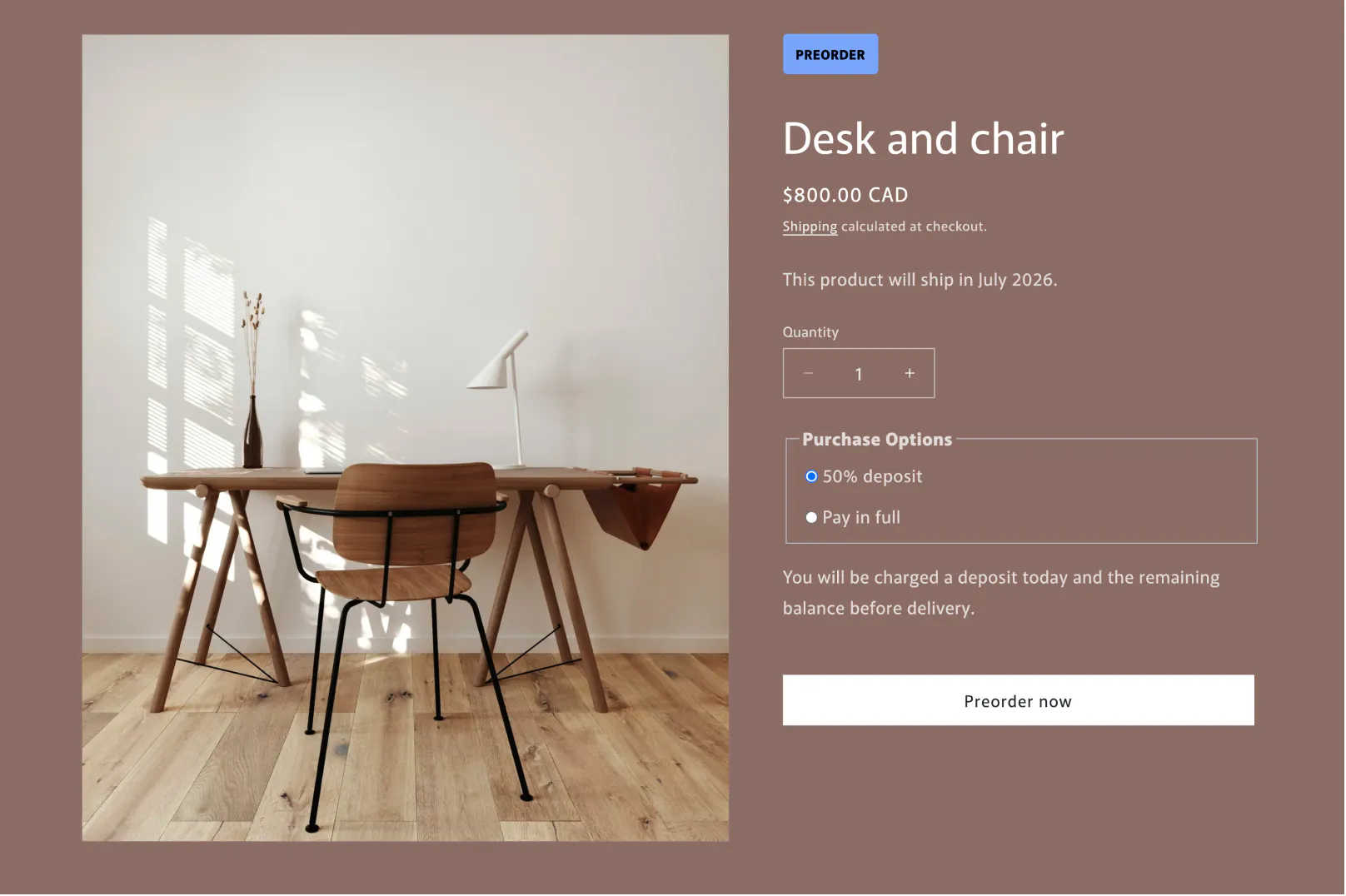
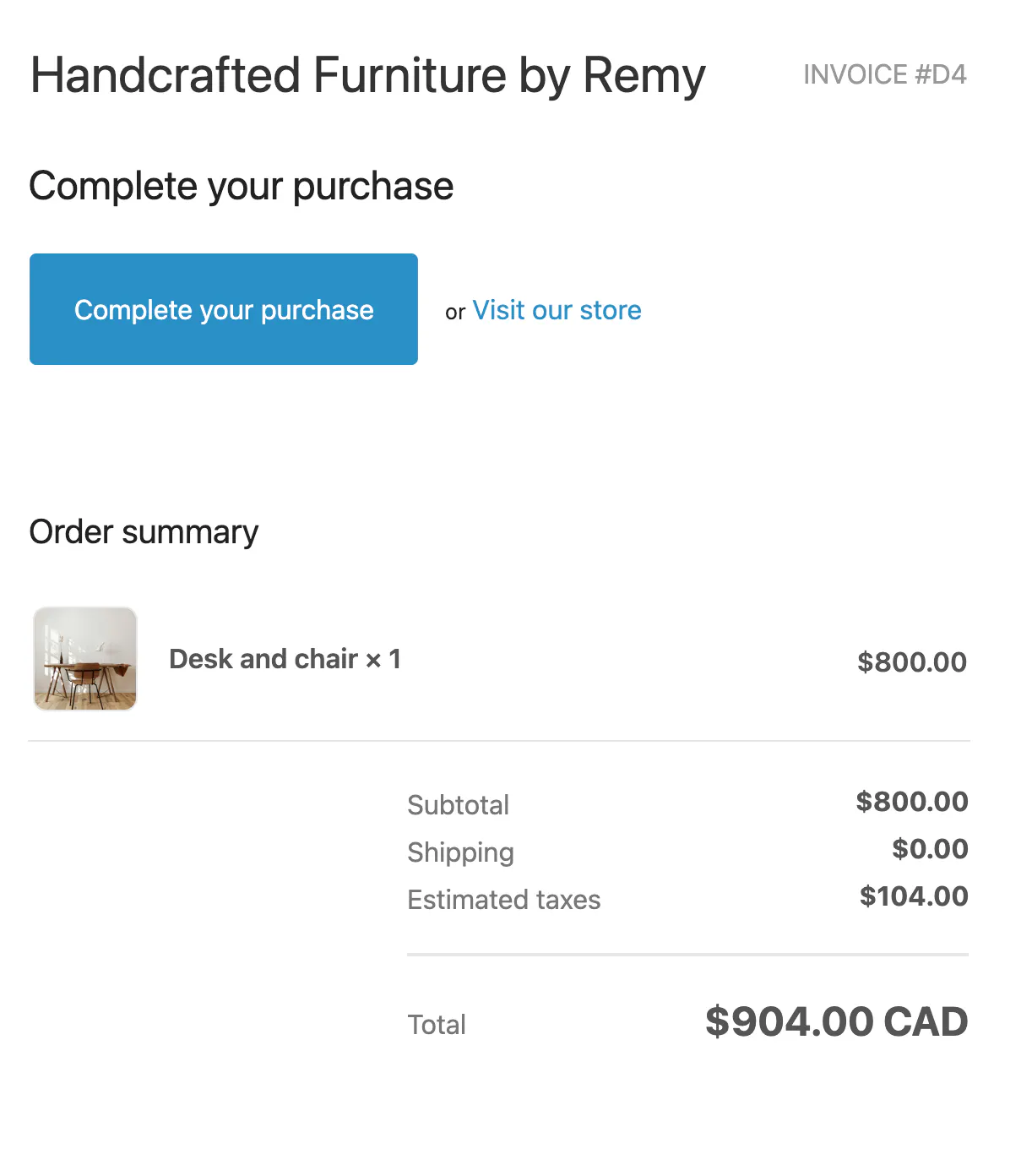
Shopify preorder for furniture using Downpay for deposits on the product page

Note
Throughout this guide, "preorder" covers both common uses of the term in ecommerce: products that haven't been released yet, and products that have sold out while you wait for more stock. Payment models and tradeoffs, as well as how apps work to enable them, apply to both.
When does a preorder make sense?
You have a launch date (or a launch window)
The most common preorder scenario: a product exists, you know roughly when it ships, and you want to capture demand before inventory lands. OOONO's CO-DRIVER NO2 launch is a great example. They built a community around the original safe-driving device, announced the sequel, and opened preorders with a delivery range customers could see at checkout. The result was 50,000 units sold in under a day.
You don't need OOONO's scale for this to work. The most important thing is a clear enough shipping window that customers know what they're agreeing to.
Your inventory is constrained and lead times are long
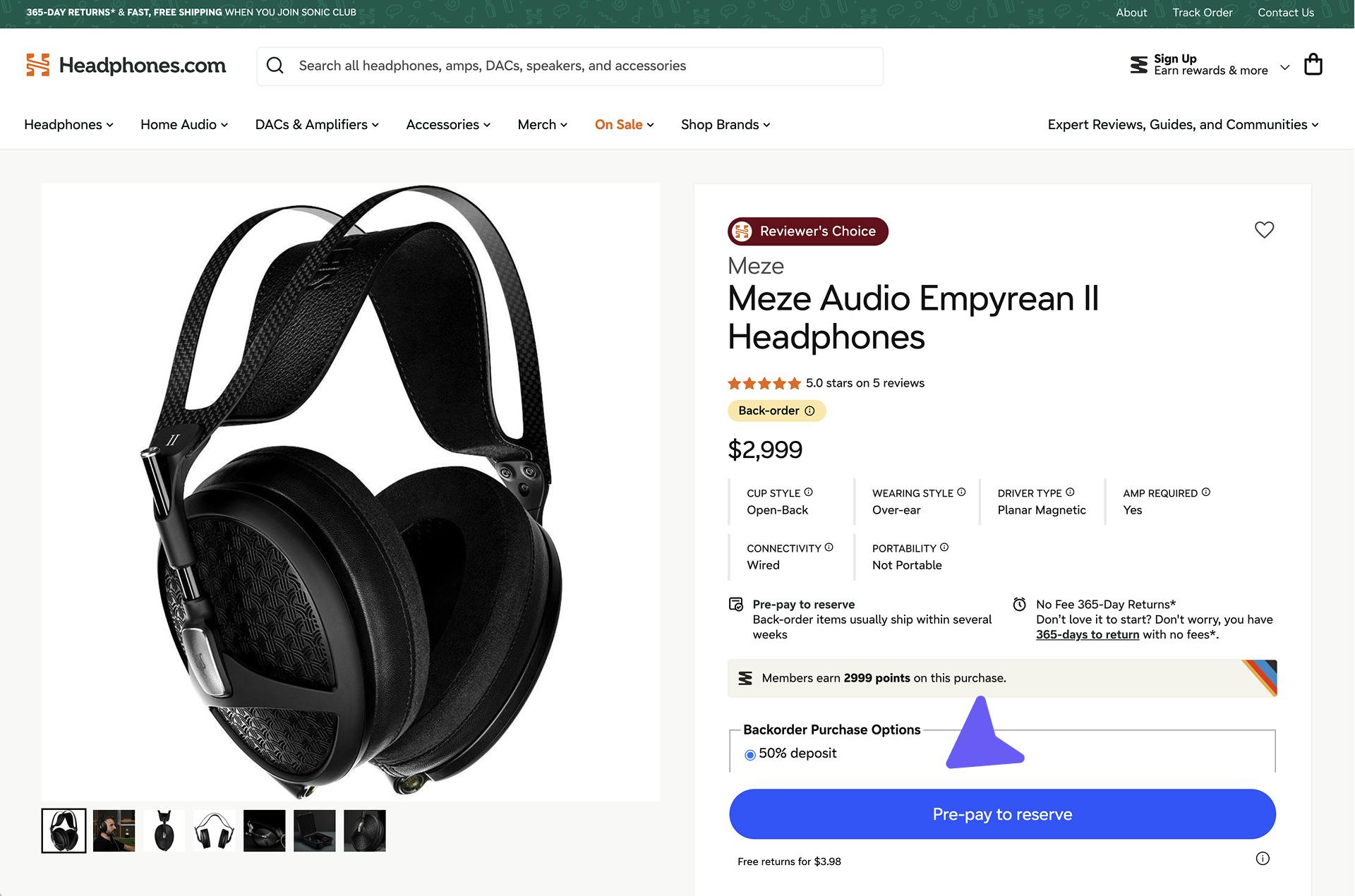
Headphones.com carries limited-release products from boutique manufacturers who build in small batches. When a product sells out between production runs, or demand for a new release outpaces available stock, lead times stretch to several months.
Asking customers to pay in full with no firm shipping date caused hesitation and cancellations. A deposit changed that: it committed the customer without requiring them to hand over hundreds or thousands of dollars for something that might not ship for months.
The same dynamic applies to any category where inventory runs in constrained batches and customers are used to waiting, such as specialty outdoor gear and limited-run sporting equipment.
Learn more about how Headphones.com reduced cancellations
Your products are made to order
Some products don't exist until a customer buys them, such as custom furniture or jewelry.
Athena Gaia sells handcrafted jewelry made by artisans in Greece. Each piece is produced after the order comes in and can take up to five weeks to reach the customer.
When full payment was the only option, customers who'd handed over several hundred dollars and had nothing in hand grew anxious. The support inbox filled up with "where is my order?" emails. A 50/50 deposit changed the dynamic: customers had committed meaningfully, but they weren't sitting on a large charge while waiting for something to be made.
Made-to-order is the use case deposits were built for. The production hasn't started, the timeline is real, and asking for full payment upfront asks the customer to carry all the risk before a single piece of work has begun.
Learn about how Athena Gaia turned buyer anxiety into loyalty and 25% AOV growth
Demand has outpaced your inventory and you're sold out
Frame makes a high-end connected Pilates reformer. When early buzz turned viral, they sold out faster than forecast. Their previous fallback, an email waitlist, wasn't working. Most customers who signed up didn't come back when inventory returned, and some found alternatives in the meantime.
By taking deposits during sold-out periods, Frame kept revenue flowing through the gap. They made 20% of all of their Black Friday and Cyber Monday 2025 sales by taking deposit orders on products they didn't have in stock.
Learn more about how Frame kept selling during out-of-stock periods
How the Shopify preorder button works
A preorder app on Shopify modifies your product pages so that when a product is designated as a preorder, the standard "Add to Cart" button is replaced with a preorder CTA. You can configure the button text, such as "Preorder now," "Reserve with deposit," or "Secure your spot," and pair it with messaging on the product page that explains the shipping timeline and payment terms.
When a customer clicks through, they complete a normal Shopify checkout. Their payment details are stored securely via Shopify's infrastructure. What happens from there depends on the payment model you've set up, which is where most of your strategic decision-making comes in.
Some apps also support mixed carts, where a merchant can add a number of preorder and regular products to a cart and have any differences in payment timing handled appropriately.
Note
Shopify preorder apps that use card vaulting (storing the card for a later charge) require Shopify Payments or a compatible gateway. If you're on a third-party processor, check compatibility before committing to a setup.
The four payment approaches
How you collect payment for a preorder is the most consequential decision in your setup. It affects your cash flow, your cancellation rate, your customer experience, and in some cases your legal exposure. Here's how each model works in practice.
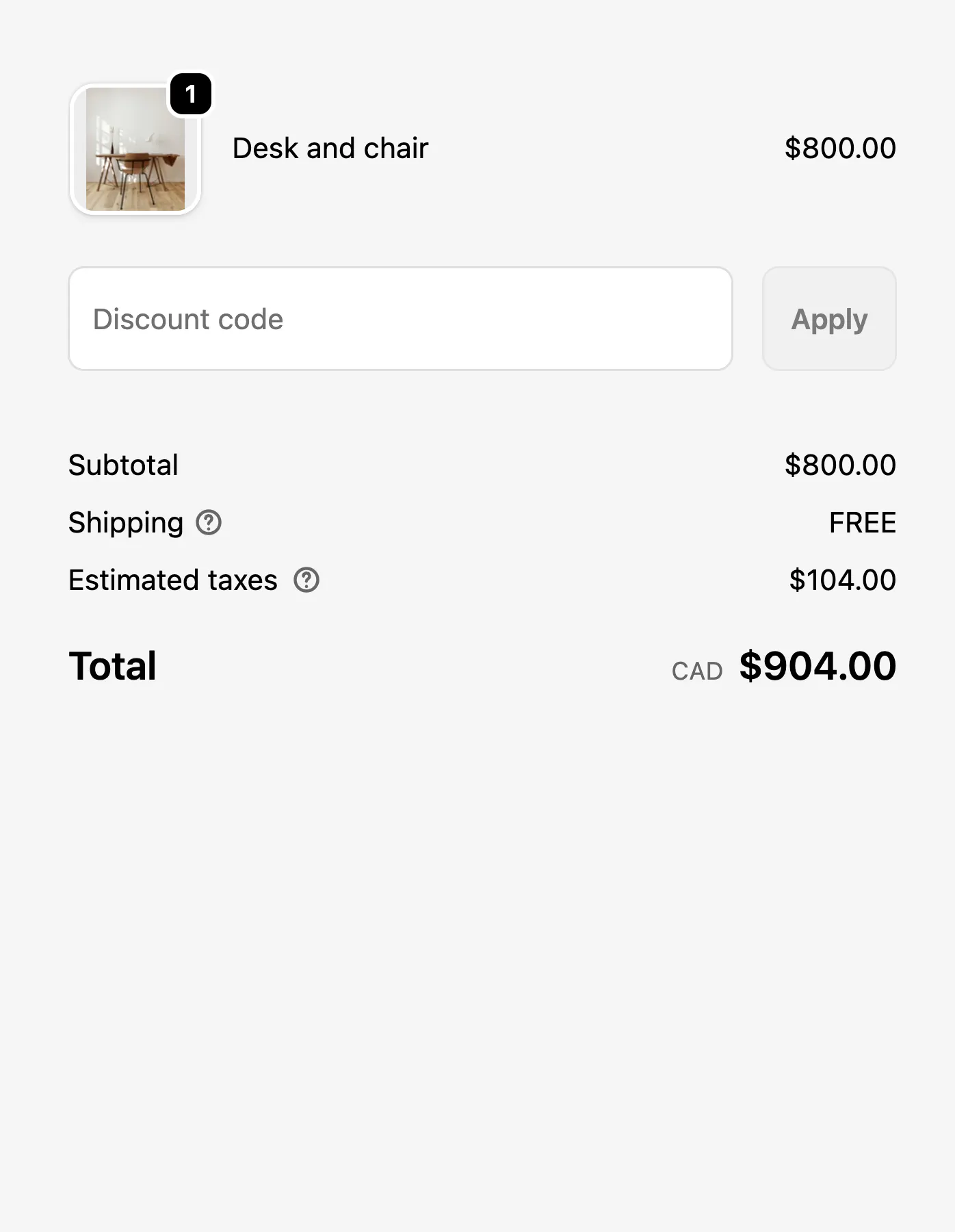
Charge upfront (full payment now)
The customer pays in full at checkout. The merchant gets immediate cash flow and can use it to fund production or secure inventory.
This is the simplest model to set up and the only one Shopify supports natively without a third-party app. Frame tried it before switching to deposits, but few customers were willing to hand over $4,999 for a reformer with no ship date. The psychological barrier is real, and it scales with the price of the product.
Pros
- Immediate cash flow: Full payment at checkout funds production without delay.
- Simple setup: No third-party app required. Shopify handles it natively.
Cons
- High friction at high AOV: The psychological barrier to paying upfront for something with no ship date is significant.
- Conversion barrier: For long lead times at high price points, expect checkout abandonment.
- Merchant carries all the risk: If timelines slip, the customer has already paid in full and will want answers.
Charge later (fully deferred)
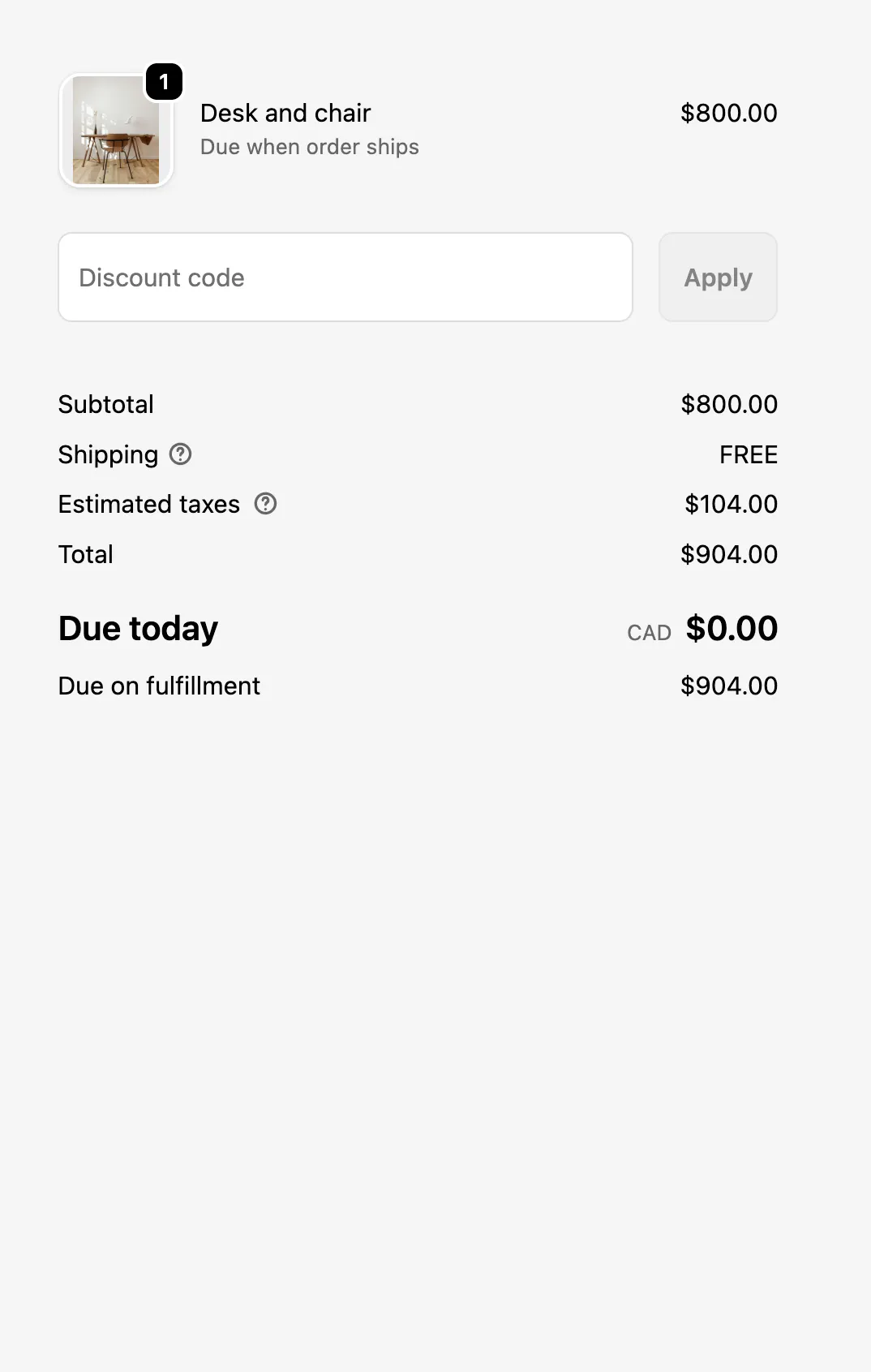
The customer enters their payment details at checkout, but nothing is collected. Their card is stored securely and charged only when the product ships. From the customer's perspective, it feels close to a normal order—except they aren't charged yet. This approach requires a third-party app.
OOONO and their sub-brand Sirène both used fully deferred payment for their European launches. The legal and operational complexity of guaranteeing concrete ship dates per customer across multiple markets in order to avoid regulatory issues made full deferral the cleanest choice.
Learn more about how Sirène built trust with automated, deferred deposits
Pros
- Regulatory fit: Works in markets with consumer protection requirements around charging before shipping.
- Low barrier: Customers pay nothing upfront, reducing friction at checkout.
Cons
- Requires third-party app: Shopify doesn't support fully deferred payments natively.
- No working capital: The merchant receives nothing during production.
- Soft commitment: Without money on the table, customers may cancel more readily.
- Payment failure risk: Card declines and expired cards are a consideration, but this can be reduced with pre-authorization.
- Gateway dependency: Card vaulting requires Shopify Payments or another compatible gateway.
Deposit (partial now, balance at fulfillment)
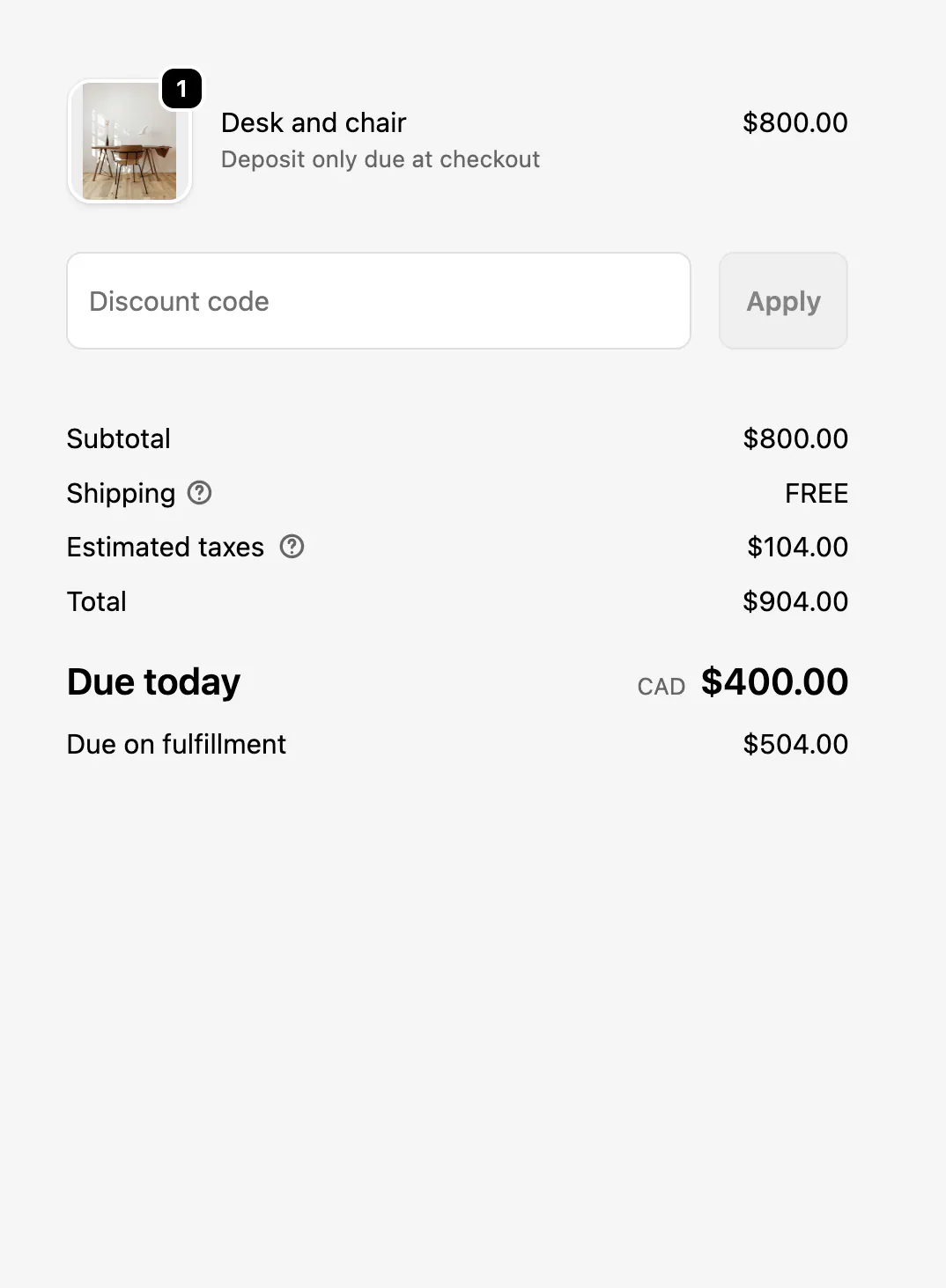
The customer pays a portion of the order at checkout, typically 30–50% for high-value products, and the balance is collected when the order ships. Their card is stored via Shopify's infrastructure; no second checkout, no invoice to chase. This approach also requires a third-party app.
Headphones.com uses a 25–50% deposit depending on the product and lead time. The range gives them flexibility: a shorter wait and a well-known product might warrant a higher deposit, while a longer wait on a limited release might warrant a lower one to reduce friction at checkout. Frame shared their collection success rate on deposit orders: 100%.
Pros
- Working capital: A deposit generates cash during the production or procurement period.
- Real commitment: With money on the table, cancellation has a cost for both sides.
- Risk distribution: Neither the merchant nor the customer carries the full weight.
- Flexibility: Deposit percentage can be tuned by product, lead time, or price point.
Cons
- Requires third-party app: Shopify doesn't support deposits natively.
- Gateway dependency: Card vaulting requires Shopify Payments or a compatible gateway.
Payment link (charge after the fact)
The merchant captures the customer's intent at checkout but doesn't store a card or charge anything. When the product is ready, they send a payment link. The customer clicks through and completes the purchase at that point.
This can be patched together natively in Shopify using draft orders. But this approach adds the overhead and complexity of creating and accounting for a second Shopify order for the same purchase. Some apps that offer split payment cause this same issue.
While low commitment can mean high conversion, it's difficult to turn that conversion into monetization.
Pros
- Lowest checkout friction: No payment commitment required upfront.
- B2B fit: Works for very high value, relationship-managed scenarios.
Cons
- High drop-off: By the time the link arrives, the customer may not follow through.
- No working capital: Like charge later, the merchant has nothing to work with during production.
- Weak commitment: Without a card on file or money paid, there's no financial cost to walking away.
- Operational burden: Using draft orders introduces manual processes and reconciliation.
For high-value products with meaningful lead times, deposits tend to thread the needle: they generate working capital, create real customer commitment, and distribute the risk in a way both sides can live with.
Why the deposit model works better for high-value products
When a product costs $500 or more, asking for full payment at checkout months before delivery asks the customer to carry all of the risk. If your timeline slips, if their circumstances change, if they find an alternative, you've got their money and they've got nothing.
That hesitation shows up in measurable ways: checkout abandonment, support tickets asking for shipping updates, and cancellations from customers who've had enough time to reconsider.
A deposit changes the dynamic. The customer commits a meaningful amount, enough to make backing out feel like a cost, without the psychological weight of the full price.
As Taron Lissimore, co-founder of Headphones.com, put it: "There's less psychological burden on customers if they aren't fronting the full amount with no ETA."
The right deposit percentage depends on your product, your lead time, and how much working capital you need. A 30% deposit on a $2,000 item gives you $600 to work with and a committed customer. A 50% deposit gives you more cash but more friction at checkout. Testing different amounts by product or lead time, as Headphones.com does, is a reasonable way to find the right balance.
For merchants who can't guarantee specific ship dates, or who are selling into markets with stricter consumer protection requirements, fully deferred payment is worth considering alongside deposits. The card-on-file mechanic is the same; the only difference is when the charge is applied.
How to add preorder deposits to Shopify with Downpay
Several Shopify apps handle deposit-based preorders.
Here's how Downpay, which was designed by Shopify alumni to handle the needs of high-value merchants, works.
Downpay runs inside the merchant's branded Shopify checkout. There are no redirects and no separate login for customers.
You configure a deposit amount—fixed dollar amount or percentage—per product, per variant, or across your entire store.
When a customer checks out, they pay the deposit and their card is stored via Shopify's infrastructure. The balance can be collected manually when you're ready, on a scheduled date, or automatically via Shopify Flow when the order ships.
Downpay also supports mixed carts with preorder and regular products.
For merchants selling into markets where charging before shipping is legally or operationally complex, Downpay's $0 deposit model handles fully deferred payment through the same mechanism: the card is vaulted at checkout and charged only at fulfillment.
Downpay is compatible with Shopify Payments, Stripe, PayPal Express, and Adyen (Shopify Plus only).
For a full guide to deposit configuration, payment timing, and examples from merchants across industries, see Downpay's guide to Shopify preorder deposits and partial payments.
Frequently asked questions
Do customers get charged right away for a Shopify preorder?
It depends on the merchant's setup. Some merchants choose to collect full payment at checkout using Shopify's native functionality. Some extend what's possible with a Shopify app, including storing the card and charging the full price when the product ships or collecting a deposit now and charging the balance on fulfillment. The payment terms should be clearly visible on the product page before customers check out.
What is the Shopify preorder button?
Shopify doesn't have a native preorder button. A preorder app from the Shopify App Store adds one to your product pages, replacing the standard "Add to Cart" button with a configurable CTA. The app also handles interfacing with Shopify to permit card storage, deposit collection, and balance capture, which Shopify's checkout doesn't support out of the box.
Can I offer preorders without Shopify Plus?
Yes. Preorder apps work on all Shopify plans. Some features are more capable on Plus, but the core deposit and deferred payment functionality is available on standard plans. Card vaulting requires Shopify Payments or a compatible gateway regardless of plan.
What do you do if a preorder is delayed?
Communicate early and specifically. Customers who've committed with a deposit are more tolerant of delays than customers who've paid in full, but they still need to know what's happening and when. A proactive update with a revised ship window is almost always better than silence. Some jurisdictions have consumer protection requirements that may apply if a delivery date was specified at checkout. If you're selling internationally, it's worth understanding the rules in your key markets.
How is a preorder deposit different from Buy Now, Pay Later?
BNPL services like Klarna or Afterpay extend credit to the customer: the merchant gets paid in full immediately, and the customer repays the BNPL provider in installments. A preorder deposit keeps the transaction entirely within Shopify: the customer pays a portion now and the rest is charged to the same card at fulfillment. There is no third party involved in the payment relationship.
11 proven strategies for improving conversion with deposits on Shopify
Learn how to share your store's deposit features with customers. Build trust and reduce friction with Downpay.
By signing up, you agree to receive marketing emails. View our privacy policy and terms of service for more info.